AI Agent Stack, Module 06: Skills, Your Team's Playbook on Demand
2026
By Module 05, the agent can search issues, read the team’s docs and be installed in one step. What it still doesn’t know is how your team does the work: which severity to pick, what a triage report looks like, what it must never do on its own. A skill is that playbook, loaded only when a task needs it. This guide sets up Module 06 of the AI Agent Stack repo, runs it, and shows where its simple matcher gets it wrong.
In the AI Agent Stack overview, I compared the six building blocks people mix up: APIs, tools, RAG, MCP, plugins and skills. Module 01 set up the issue tracker API, and Module 05 packaged the setup as a plugin, including a skill called issue-triage. This post opens that skill up: github.com/likarajo/ai-agent-stack/tree/main/06-skills.
Tools give an agent hands. A skill gives it the playbook.
Watch the video
1. What it is
A skill is a reusable package of instructions. Usually it’s a folder with a SKILL.md file: a short name and description at the top, then steps, rules, templates and sometimes helper files.
The key idea is progressive loading, which happens in two stages:
| Stage | What the agent has in context |
|---|---|
| At startup | Only each skill’s name and one-line description: the catalog |
| When a task matches | The full SKILL.md: when to use it, the steps, the rules and the report template |
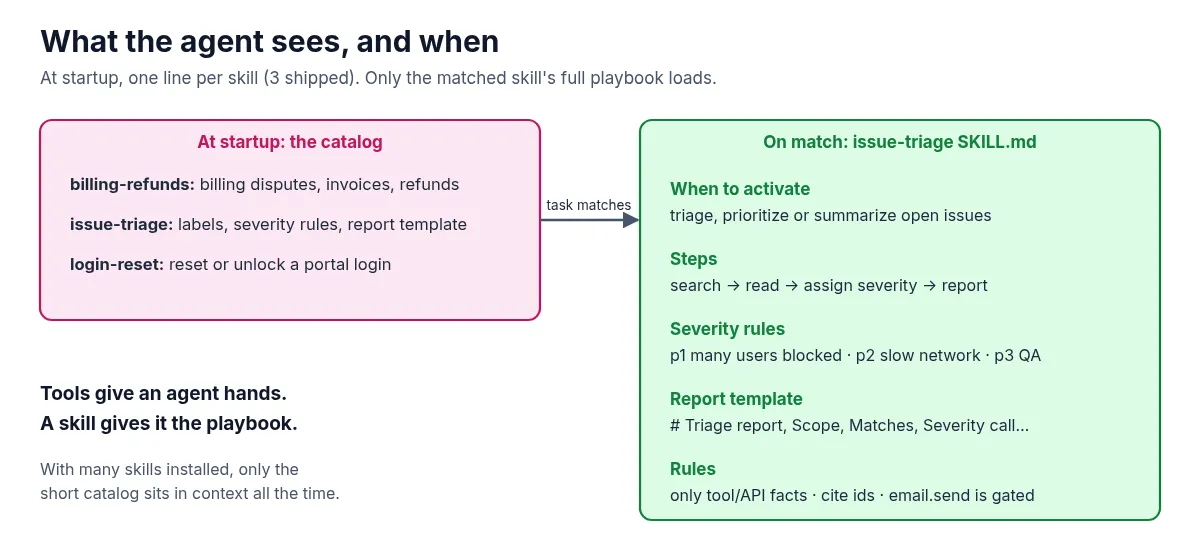
With a few skills this doesn’t save much. With dozens installed, it means only the short catalog sits in the context window all the time, and each playbook is loaded only when it’s needed. The catalog reader stops at the closing front-matter fence, so skill bodies stay unloaded until load_full runs.
2. Why it matters
Tools and MCP let an agent do things. Skills make it do them your way. Without a skill, you end up repeating the same instructions in every prompt: use these severity levels, keep existing labels, use this report format, cite issue ids, don’t send email without asking.
A skill also isn’t RAG. RAG from Module 03 looks up facts in your docs. A skill teaches a procedure. The triage skill even points to the runbook’s guidance for severity, but the steps themselves live in the skill.
That gives the rule of thumb for this module: keep explaining the same procedure to your agent? Write a skill.
3. The running example
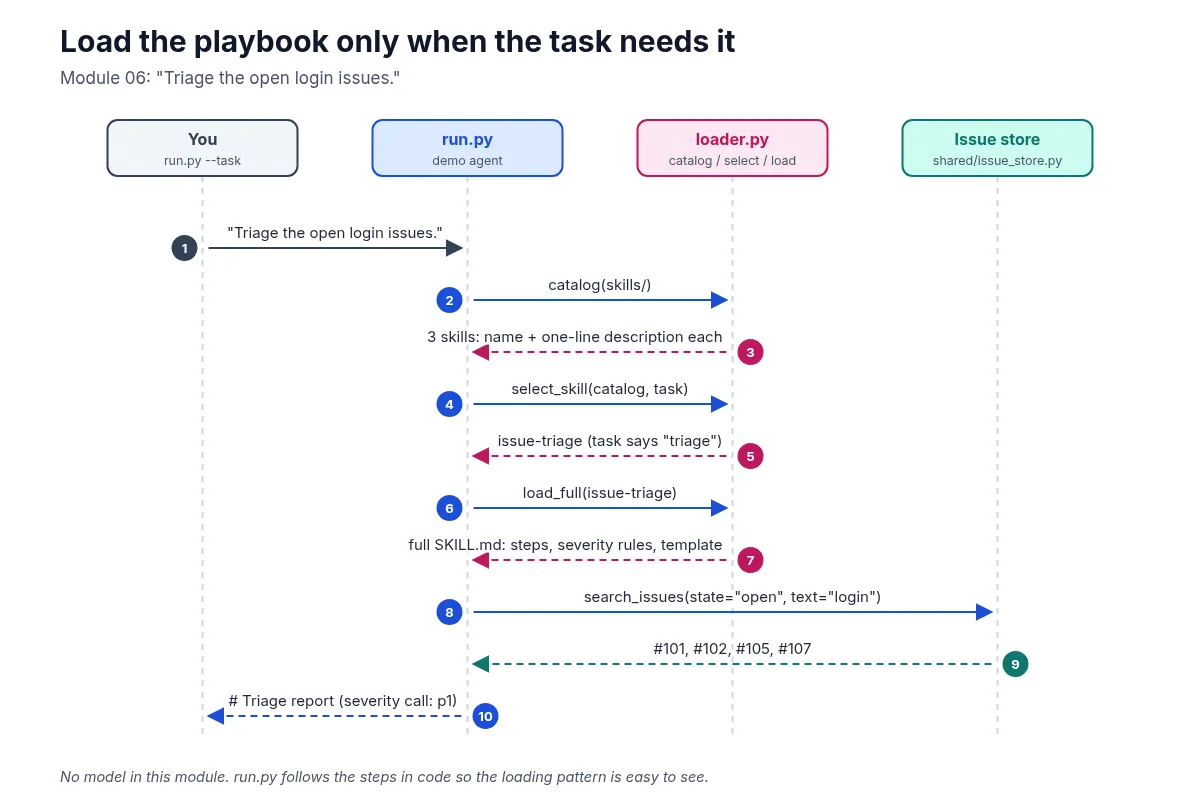
The task is “Triage the open login issues.” The repo ships three skills under 06-skills/skills/: issue-triage, billing-refunds and login-reset. The default task matches issue-triage (06-skills/skills/issue-triage/SKILL.md). Its steps are:
- Search open issues for the symptom text (default:
login). - For each match, read the title, labels, assignee and body.
- Assign severity: p1 if production login is blocked for many users, p2 if it’s intermittent or slow-network only, p3 if it’s a staging or QA inconvenience.
- Prefer existing severity labels when they’re already there.
- Write a triage report using the template, and don’t invent issue ids.
It also has rules, including this one: emailing a summary is a gated action (email.send), so the agent should propose it, not quietly do it. Module 07 shows that gate working.
4. Set it up
You need Python 3.11 or newer and git. There’s no model and there are no API keys.
Clone the repo and create a virtual environment from the repo root (you can reuse the clone from the earlier modules):
git clone https://github.com/likarajo/ai-agent-stack.git
cd ai-agent-stack
python3 -m venv .venv
source .venv/bin/activate
pip install -r 06-skills/requirements.txt
The only dependency is pytest.
Run everything from the repo root. This module needs two folders on PYTHONPATH: 06-skills for its agent package and . for shared/. That’s why the commands below use PYTHONPATH=06-skills:..
5. Run it
PYTHONPATH=06-skills:. python 06-skills/agent/run.pyThe output has three parts. First, the catalog, which is all the agent sees at startup:
# Skill catalog (startup — names/descriptions only)
- billing-refunds: Handle billing disputes, invoice corrections, and refund requests for Northwind portal charges.
- issue-triage: Triage open issues using Northwind labels, severity rules, and a standard report template.
- login-reset: Reset or unlock a portal login when a user cannot sign in after SSO or password failures.
Then the selected skill, with the full SKILL.md body printed up to the report template. Then the report:
# Triage report
- Scope: open issues matching 'login'
- Matches:
  - #101 Login page hangs after SSO redirect [auth, bug, p1] → severity p1
  - #102 Login timeout after 30s on slow networks [auth, bug, p2] → severity p2
  - #105 Document login timeout troubleshooting [docs, auth] → severity p?
  - #107 Login rate limit too aggressive for QA [auth, infra, p3] → severity p3
- Severity call: p1 (from labels + auth runbook guidance in the skill)
- Next step: Confirm /health/auth latency and link the login-timeout runbook on each open auth bug.
The same four issues as every earlier module, now in the team’s format. #105 is a docs task with no severity label, so it gets p? instead of a made-up level.
Now try a task no skill covers:
PYTHONPATH=06-skills:. python 06-skills/agent/run.py --task "What's the weather in Austin?"# Skill catalog (startup — names/descriptions only)
- billing-refunds: Handle billing disputes, invoice corrections, and refund requests for Northwind portal charges.
- issue-triage: Triage open issues using Northwind labels, severity rules, and a standard report template.
- login-reset: Reset or unlock a portal login when a user cannot sign in after SSO or password failures.
No skill matched; refusing to invent a playbook.That’s the right behavior. A billing question now picks the billing skill (not a login one):
PYTHONPATH=06-skills:. python 06-skills/agent/run.py --task "Summarize the open billing issues."# Selected skill: billing-refunds
...
# Billing summary
- Scope: open issues matching 'billing'
- Matches:
- #106 Export CSV for billing reports [billing, enhancement]
- Next step: Draft refund request fields; do not silently issue credits.But try the series’ familiar question without the word “triage”:
PYTHONPATH=06-skills:. python 06-skills/agent/run.py --task "Which open issues mention login?"# Selected skill: login-reset
...
# Login access summary
- Scope: open issues matching 'login'
- Matches:
- #101 Login page hangs after SSO redirect [auth, bug, p1]
- #102 Login timeout after 30s on slow networks [auth, bug, p2]
- #105 Document login timeout troubleshooting [docs, auth]
- #107 Login rate limit too aggressive for QA [auth, infra, p3]
- Next step: Confirm lockout vs timeout; follow login-timeout runbook if spinner hangs.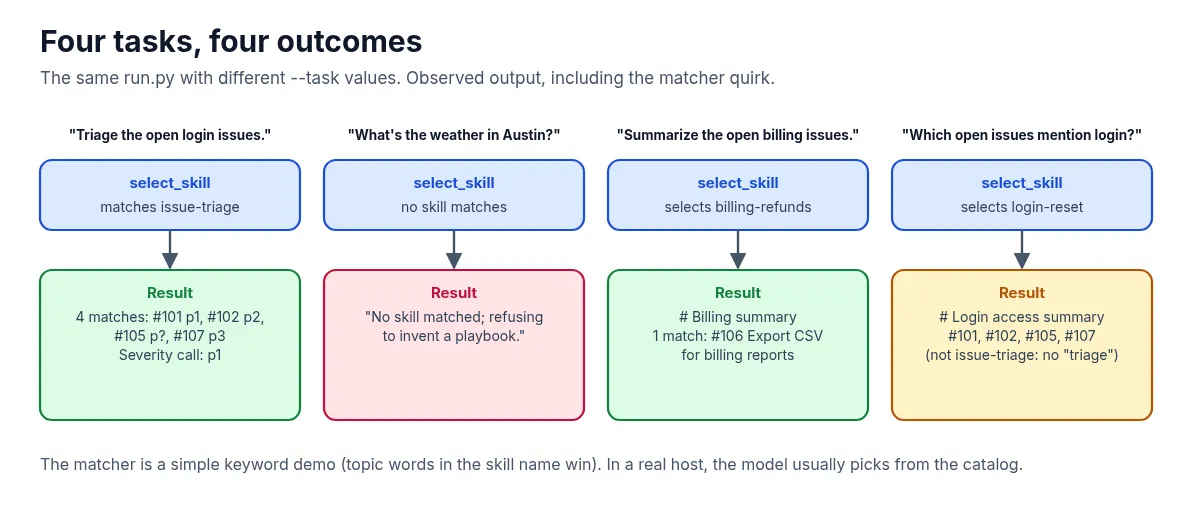
Billing beats login when the task is about billing. The remaining matcher quirk is that “Which open issues mention login?” selects login-reset (the skill whose name contains login) instead of issue-triage. Say “triage” and you get the playbook; say only “login” and you get the reset skill. The matcher is still a simple demo of the loading pattern. In a real host, a model usually reads the catalog and decides.
6. How it works inside
There are three files to read, in this order:
-
06-skills/skills/*/SKILL.mdfiles are the skills. Front matter is what goes in the catalog; for triage:--- name: issue-triage description: Triage open issues using Northwind labels, severity rules, and a standard report template. ---Everything below it (when to activate, steps, report template, rules) only gets loaded on a match.
billing-refundsandlogin-resetfollow the same shape. -
06-skills/agent/loader.pyhas the three steps of progressive loading:catalogreturns name and description for each skill folder (metadata only — it stops at the closing---fence),select_skillpicks one for the task, andload_fullreturns the whole body. The matcher scores name hits higher than description hits, ignores generic stop tokens like “open” and “issues”, and adds a strong boost when the task and skill name share a topic word:for token in name_tokens: if token in task_l: score += 5.0 for token in desc_tokens: if token in task_l: score += 1.0 if "billing" in task_l and "billing" in meta.name: score += 20.0 if "login" in task_l and "login" in meta.name: score += 20.0 if "triage" in task_l and "triage" in meta.name: score += 20.0That topic boost is why billing questions pick
billing-refunds, and why a plain “login” question pickslogin-resetunless you also say “triage”. -
06-skills/agent/run.pyfollows the selected playbook in code. It searches open issues forbilling,login, or the whole task, then formats either a triage report, a billing summary or a login-access summary. For triage it keeps each issue’s existingplabel as its severity, takes the highest one as the overall call, and fills in the template. The “Next step” line is fixed text per skill.
7. Test it
The tests don’t need a model:
PYTHONPATH=06-skills:. pytest 06-skills/tests -q -rA..... [100%]
=========================== short test summary info ============================
PASSED 06-skills/tests/test_skills_smoke.py::test_catalog_is_metadata_only
PASSED 06-skills/tests/test_skills_smoke.py::test_catalog_is_lazy_no_full_parse
PASSED 06-skills/tests/test_skills_smoke.py::test_billing_question_selects_billing_skill
PASSED 06-skills/tests/test_skills_smoke.py::test_select_and_load
PASSED 06-skills/tests/test_skills_smoke.py::test_run_produces_report(-q -rA is the quiet progress plus short pass summary the module README uses. Pass lines may vary slightly by pytest version.)
The five smoke tests check that the catalog is metadata-only and loads lazily (no full body parse at startup), that a billing question selects billing-refunds, that the login triage task selects issue-triage and loads a body with the report template and severity rules, and that a full run prints a triage report with #101 or #102 in it.
What’s next
That’s all six building blocks, each on its own. Module 07 puts them together: one agent that loads the plugin, picks the skill, retrieves from the docs, calls the MCP server, the tools and the API, and asks a model, with every step recorded in agent-debugger and a human approval gate before any email goes out.
Code: github.com/likarajo/ai-agent-stack/tree/main/06-skills