AI Agent Stack, Module 03: RAG, Answers Grounded in Your Own Docs
2026
A model doesn’t know how your team fixes login timeouts. Your runbook does. RAG (retrieval-augmented generation) finds the right passages in your own docs and puts them in front of the model at question time. This guide sets up Module 03 of the AI Agent Stack repo, runs it, and looks closely at what it actually retrieved.
In the AI Agent Stack overview, I compared the six building blocks people mix up: APIs, tools, RAG, MCP, plugins and skills. Module 01 set up the issue tracker API, and Module 02 let a model propose tool calls against it. This post covers the next module: github.com/likarajo/ai-agent-stack/tree/main/03-rag.
Tools fetch live data. RAG brings in written knowledge. This module has no tools at all: just three Markdown docs, a tiny local index, and one question.
Watch the video
1. What it is
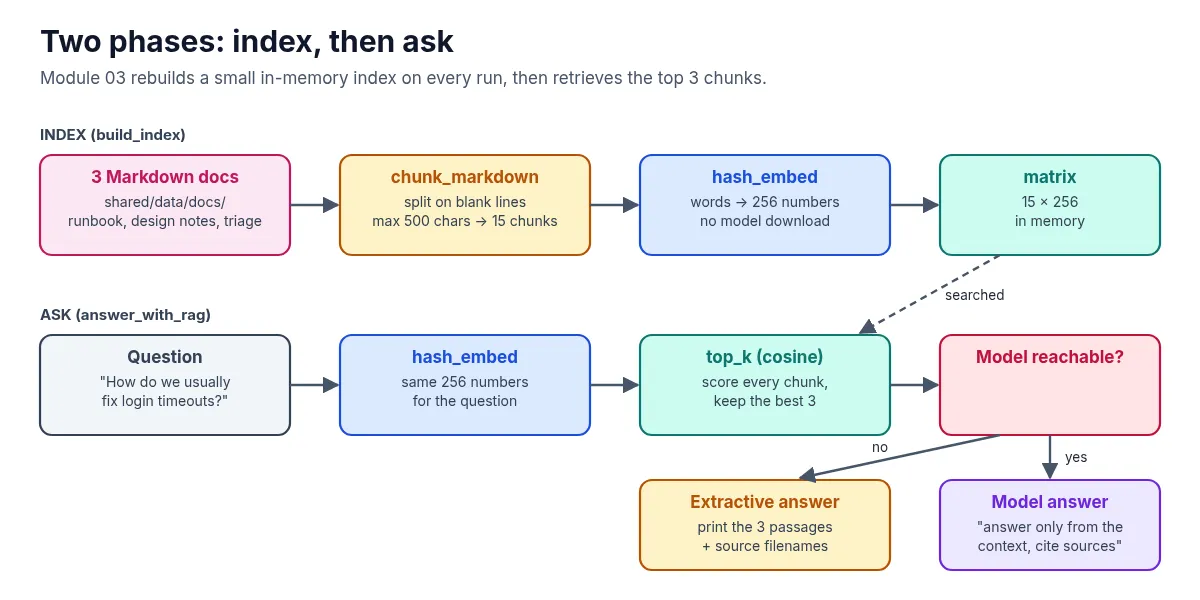
RAG gives a model relevant information from your data at question time. The model doesn’t learn anything new. Your code finds the right passages and puts them in the prompt, and the answer cites where they came from.
It happens in two phases:
| Phase | What happens in this module |
|---|---|
| Index | Split 3 Markdown docs into 15 chunks and turn each chunk into a vector of 256 numbers |
| Ask | Turn the question into a vector the same way, score every chunk by cosine similarity, keep the top 3 |
The docs live in shared/data/docs/: a login timeout runbook, auth design notes, and issue triage conventions for the same fictional Northwind portal as the issue tracker.
2. Why it matters
In Module 02, a tool fetched live issue data. Some questions aren’t about live data, though. “How do we usually fix login timeouts?” is answered by a runbook somebody wrote, not by a database query.
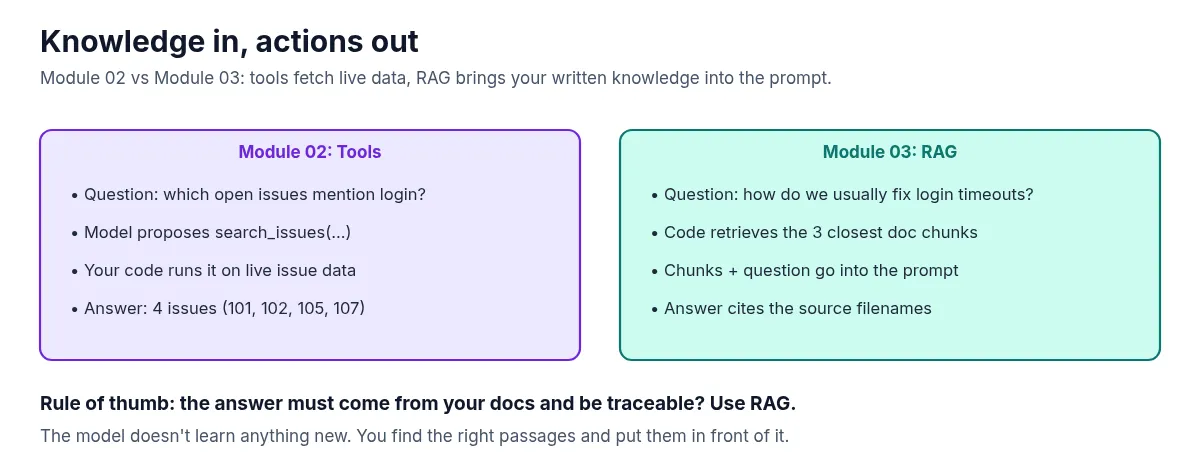
That gives the rule of thumb for this module: the answer must come from your docs and be traceable? Use RAG. The sources line is the traceable part. If the answer is wrong, you can open the file and see why.
3. The running example
The question for this module is: “How do we usually fix login timeouts?”
The runbook has a “Standard fix order” section with six steps, starting with reproducing in an incognito window and checking /health/auth latency. Ideally, that’s the chunk the retriever finds. You’ll see in a moment that it doesn’t, and why.
4. Set it up
You need Python 3.11 or newer and git. A model is optional.
Clone the repo and create a virtual environment from the repo root (you can reuse the clone from the earlier modules):
git clone https://github.com/likarajo/ai-agent-stack.git
cd ai-agent-stack
python3 -m venv .venv
source .venv/bin/activate
pip install -r 03-rag/requirements.txt
That installs three packages: numpy, httpx and pytest. There are no API keys to set, and nothing to download for the embeddings.
Run everything from the repo root, so the shared/ package (the docs, the embedder and the small model client) can be imported.
5. Run it
Run the question without a model:
SKIP_MODEL=1 PYTHONPATH=. python 03-rag/rag_demo/ask.py[extractive RAG — no LLM]
Question: How do we usually fix login timeouts?
Top passages:
[auth-design-notes.md | score=0.611]
## Agent-friendly tip
When someone asks "how do we usually fix login timeouts?", start from the login-timeout runbook, then search open issues mentioning login.
---
[login-timeout-runbook.md | score=0.218]
# Login timeout runbook
---
[auth-design-notes.md | score=0.121]
## Timeouts
The browser client historically used a 30s hard timeout around step 4.
On constrained mobile networks the token exchange can exceed 30s, which looks like a hung login.
Sources: auth-design-notes.md, login-timeout-runbook.mdWithout a model, the module prints the retrieved passages instead of a generated answer. That’s useful, because it shows exactly what a model would have been given. Scores are stable across runs (fixed embedding hash plus an index-order tie-break).
And here’s the honest part. Look at what came back:
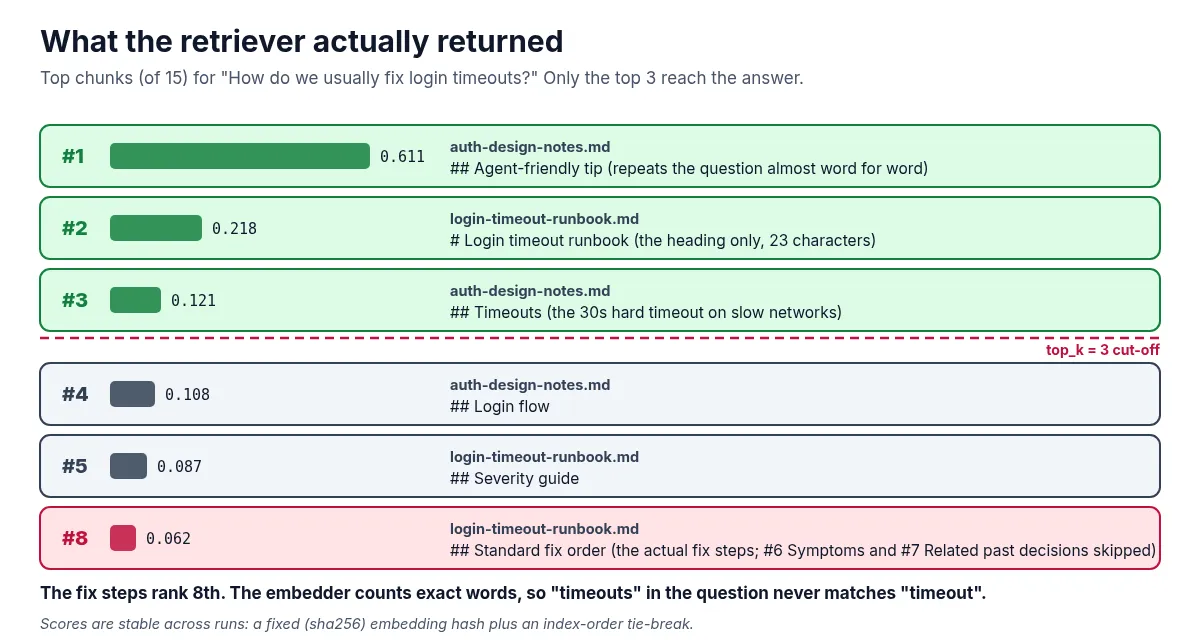
- The top hit is a note that repeats the question almost word for word and says “start from the login-timeout runbook.” It points at the answer but isn’t the answer.
- The second hit is the runbook’s title line on its own.
- The “Standard fix order” chunk, with the six actual steps, ranks 8th (score 0.062), so it never reaches the answer.
So the sources are right, but the fix steps themselves aren’t in the context. A model given only these three passages has no fix steps to quote. The system prompt tells it to say it doesn’t know when something’s missing.
To use a model, run without SKIP_MODEL while Ollama is running (default model qwen2.5:0.5b), or set OPENAI_BASE_URL, OPENAI_API_KEY and OPENAI_MODEL for a hosted OpenAI-compatible endpoint. If Ollama also has nomic-embed-text pulled, the module uses it for embeddings instead of the local hashing embedder, so the ranking will be different.
6. How it works inside
There are three small files to read, in this order:
-
shared/embeddings.pydoes the chunking and the embedding.chunk_markdownsplits on blank lines (500 characters max per chunk), which is why a heading can end up as a chunk on its own.hash_embedcounts words into 256 buckets, with a process-stable index so scores don’t depend onPYTHONHASHSEED:def _stable_token_index(token: str, dim: int) -> int: """Process-stable bucket index (avoids PYTHONHASHSEED-randomized hash()).""" digest = hashlib.sha256(token.encode("utf-8")).digest() return int.from_bytes(digest[:8], "little") % dim def hash_embed(text: str, dim: int = 256) -> np.ndarray: """Deterministic local embedding that needs no model download.""" vec = np.zeros(dim, dtype=np.float32) for token in tokenize(text): vec[_stable_token_index(token, dim)] += 1.0 norm = float(np.linalg.norm(vec)) if norm: vec /= norm return vecThis is a bag of words, not meaning. “timeouts” and “timeout” are different words to it, which is a big part of why the fix-order chunk (it says “timeout”) ranks low for a question that says “timeouts”. Ranking uses highest score first with a stable tie-break by chunk index, so the top hit for the example query stays
auth-design-notes.mdacross rebuilds. -
03-rag/rag_demo/index.pybuilds the index. It reads every*.mdfile inshared/data/docs/, chunks it, and stacks the vectors into a 15 × 256 matrix. The index is rebuilt in memory on every run. Nothing is written to disk. -
03-rag/rag_demo/ask.pyretrieves the top 3 chunks, formats them with their source and score, and either prints them (no model) or sends them to the model with a strict instruction:{ "role": "system", "content": ( "Answer only from the provided context. " "Cite source filenames. If missing, say you don't know." ), },
If you want to see the full ranking yourself, this prints the score of every chunk:
SKIP_MODEL=1 PYTHONPATH=.:03-rag python -c "
from rag_demo.index import build_index
from shared.embeddings import embed_texts, top_k
ix = build_index()
q = embed_texts(['How do we usually fix login timeouts?'])[0]
for rank, (i, score) in enumerate(top_k(q, ix.matrix, k=15), 1):
    print(rank, round(score, 3), ix.chunks[i].source, ix.chunks[i].text.splitlines()[0])
"
7. Test it
The tests don’t need a model:
PYTHONPATH=. pytest 03-rag/tests -q -rA.... [100%]
=========================== short test summary info ============================
PASSED 03-rag/tests/test_rag_smoke.py::test_index_has_chunks
PASSED 03-rag/tests/test_rag_smoke.py::test_retrieval_finds_login_runbook
PASSED 03-rag/tests/test_rag_smoke.py::test_example_query_top_passage_is_deterministic
PASSED 03-rag/tests/test_rag_smoke.py::test_extractive_answer(-q -rA is the quiet progress plus short pass summary the module README uses. Pass lines may vary slightly by pytest version.)
The four smoke tests check that the index has chunks (one vector per chunk), that retrieval for the login timeout question returns login or timeout text from an auth or runbook source, that the example query’s top passage is deterministically auth-design-notes.md, and that the no-model answer includes a sources line. They check that retrieval lands in the right files, not that it finds the fix steps, which is exactly the gap the run above shows.
What’s next
So far, the tools from Module 02 only work inside one app. Module 04 wraps the same issue tools in an MCP server, so any MCP-capable host can discover and call them over a standard protocol, without copying the tool code.